Linux configuration tool for Endgame Gear wireless mice
Linux configuration tool for Endgame Gear wireless mice (OP1w and XM2w)
The OP1w 4k v2 is the best mouse I’ve ever had. Its light (60g), wireless, low latency, but the best is the form and size. It’s small, and for some reason, the shape and weight distribution is just right. At the same time I ordered the OP1w I also ordered a Logitech G Pro X Superlight 2. While on paper the Superlight might even be better (longer battery life, big cooperation), its ambidextrous shape and desire to fit everyone’s hand and gripping style, makes it the inferior product.
As a software developer, I am also happy to see a (Windows) native configuration client for their mice in the year 2026, instead of slow, completely unnecessary, resource wasteful, JavaScript electron desktop application. Endgame Gear (egg) software is Windows MFC C++ application with a download size of 2MB. It consumes 3MB RAM, and almost no CPU time and vram while running. Compare that to the Logitech G Hub electron app, which uses 300MB memory, 100MB vram and consumes 30x cpu cycles while offering the exact same functionality.
The windows client binary isn’t obfuscated, and with Ghidra, Wireshark and USBPcap, is possible to statically analyze the binary as well as listen to the USB traffic while using the Windows client. With this data, it’s possible to reverse engineer the USB configuration protocol used by the Windows client, and write a Linux client using the same protocol from scratch.
Later, I’ve bought a OP1w v1 as comparison, to fill in the differences into the protocol and used the configuration tools for the XM2 to support these mice as well, based on the knowledge gained from the OP1w models.
Linux client
I used Opus 5 to analyze my pcap captures and compare and validate them against the ghidra analysis. You can find all
the details in the re folder here.
Opus 5 also wrote a C++ Qt GUI application (egg-gui) as well as a command line application (egg-cli) to set mouse
configuration parameters.
egg-cli
 jzab@ fedora ~/Documents/code/endgame/endgame-op1w/build 1010
 $ ./egg-cli
usage: egg-cli <command> [args]

  info                          device, firmware and battery
  show                          current configuration
  blob                          hexdump the raw 1024-byte config blob
  listen                        print device notifications as they arrive

  set cpi <1-4> <x> [y]         CPI for one stage, in CPI units
  set cpi-levels <1-4>          number of active stages
  set active-stage <1-4>        which stage is selected
  set lod <mm>                  lift-off distance; v1 offers 1 and 2,
                                v2 offers 0.7 - 2.0 in 0.1 steps
  set angle-snap <on|off>
  set ripple <on|off>
  set angle-tuning <-30..30>    degrees
  set led-liftoff <on|off>
  set polling <4000|2000|1000|1000ps|125>
                                1000ps = 1000 Hz with wireless power
                                saving; 125 = office mode
  set motion-sync <on|off>
  set glass-mode <on|off>
  set max-sensor-fps <on|off>   v2 models only
  set motion-jitter <on|off>    v1 models only
  set slamclick <on|off>
  set multiclick <on|off>       v2 models only
  set power-saving <1-120|off>
  set deep-sleep <1-120|off>
  set click-filter <button> <1-15|gx-safe|gx-speed>
  set left-handed <on|off>

  map <button> mouse <left|right|middle|back|forward>
  map <button> key <mods> <usage>   mods: bitmask, usage: HID code
  map <button> wheel <up|down>
  map <button> consumer <usage>     e.g. 0xEA = volume down
  map <button> cpi-cycle            cycle through the CPI stages
  map <button> cpi <x> [y]          fixed CPI, in CPI units
  map <button> none

  pair                          re-pair the mouse to the dongle
  factory-reset                 restore the mouse to defaults

buttons: left right middle back forward special wheel-up wheel-down
SPDT modes apply to left and right only.
 jzab@ fedora ~/Documents/code/endgame/endgame-op1w/build 1011
 $ ./egg-cli info
Device      : Endgame Gear HS Dongle (wireless)
Model       : OP1w 4k
Path        : /dev/hidraw1
Dongle FW   : 1.01
Mouse FW    : 1.08
Battery     : 65 %
Signal      : 39
 jzab@ fedora ~/Documents/code/endgame/endgame-op1w/build 1012
 $ ./egg-cli show
CPI stages  : 400, [800], 1600, 3200
CPI levels  : 4
LOD         : 1.0 mm
Angle snap  : off
Ripple ctrl : off
Angle tuning: -128 deg
LED liftoff : on
Polling     : 1000 Hz
Motion sync : off
Glass mode  : off
Max sensor  : off
MotionJitter: on
Slamclick   : on
Multiclick  : off
Power saving: 1 min
Deep sleep  : 3 min
Left-handed : off
Click filter:
  Left        8
  Right       8
  Middle      8
  Back        8
  Forward     8
Buttons     :
  Left        Left click
  Right       Right click
  Middle      Middle click
  Back        Back
  Forward     Forward
  Special     CPI cycle
  Wheel up    Wheel up
  Wheel down  Wheel down
 jmeyer@ fedora ~/Documents/code/endgame/endgame-op1w/build 1013
 $
egg-gui
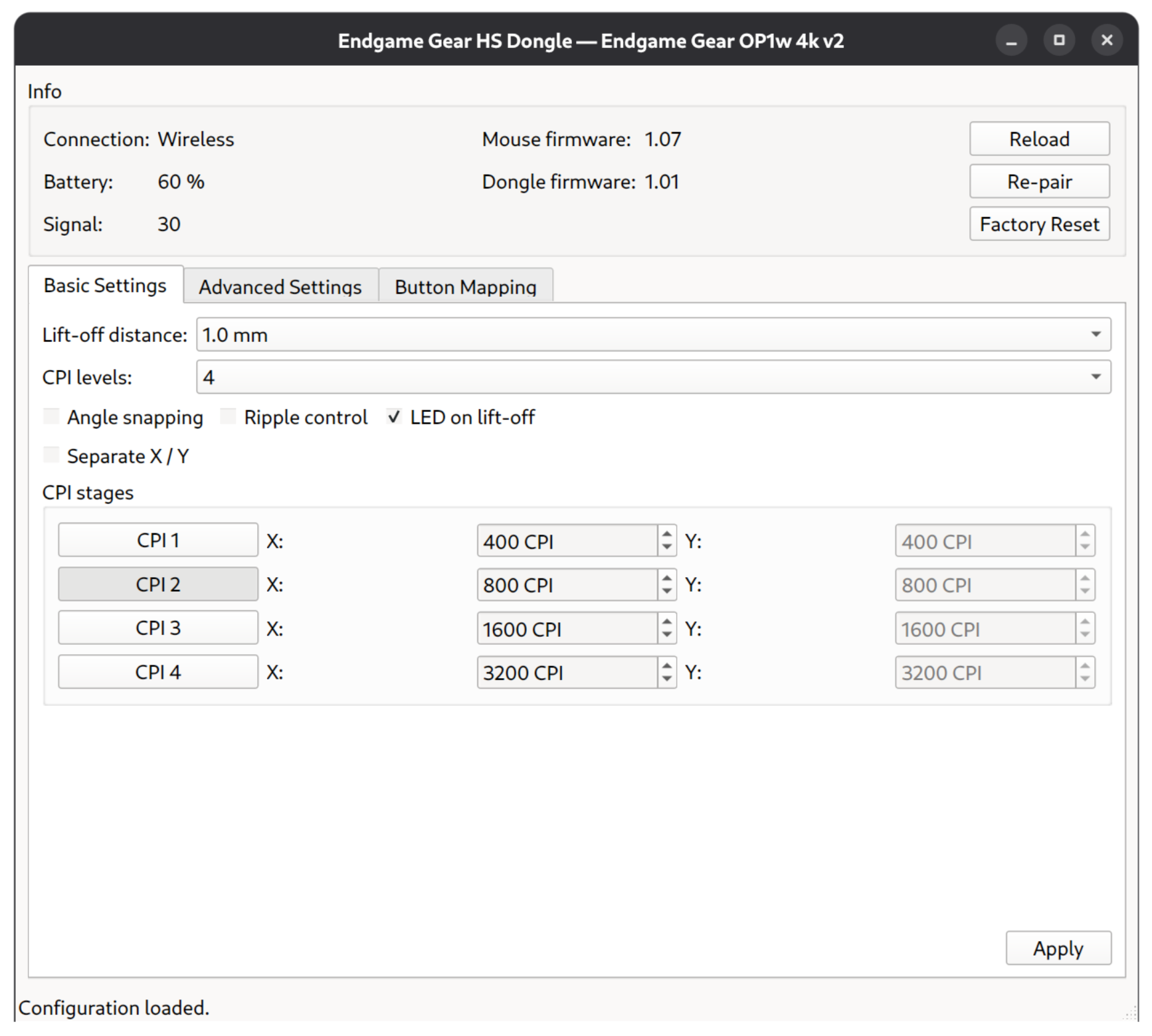
The GUI is based on the original Windows client developed by egg. Here is a screenshot, running in GNOME:
Source code
You can find the source code at github.com: endgame-op1w
How to build:
Check out the code, e.g. git clone https://github.com/johanneszab/endgame-op1w.git
Debian based (apt)
sudo apt install build-essential cmake pkg-config libhidapi-dev qt6-base-dev
cmake -B build -S .
cmake --build build -j
Red hat based (dnf)
sudo dnf install @c-development @development-tools
sudo dnf install build-essential cmake pkgconf-pkg-config hidapi-devel qt6-qtbase-devel
cmake -B build -S .
cmake --build build -j
The GUI is optional — if Qt 6 isn’t found, only egg-cli is built. The binaries are in the build folder.